
Create a Knowledge Space
Add a space for one topic and choose whether it is for candidates or for your HR team only.
- Click Knowledge in the left menu.
- Click + New Knowledge Space.
- Enter a Name, for example Joining & Onboarding.
- Under Who is this for?, choose Candidates (Talence AI can use it to answer candidates on WhatsApp) or HR team only (internal, never sent to candidates).
- Click Create Space.
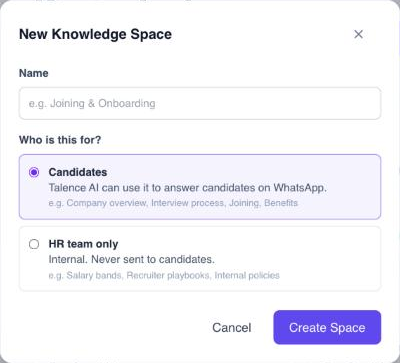
Good topics for candidate spaces: company overview, hiring and interview process, joining and onboarding, benefits and policies, offer and candidate support. Good topics for HR team only spaces: salary bands, recruiter playbooks, internal policies.
Rename or delete a space
Open the space and use Rename or Delete Space. When you delete a space, its documents immediately stop being searchable.
Good to know: Next, add documents to the space.
Didn't find what you needed?
Email contact@talenceai.com